Three questions before you Approve Bitcoin transactions — or you’re signing blind
Before you tap Approve on a Bitcoin wallet, the screen preview is not the contract you sign. What settles on-chain is the PSBT: outputs, change, sighash flags, and fee. Ask three questions first: is every output the one I intend, is change returning to my descriptor, and am I signing this exact object rather than a remote preview. If any answer is inferred from a phone or dapp screen alone, you are signing blind.
What you approve is not what you signed.
- Émise
- Updated
- Lecture
- 8 min
What you approve is not what you signed
CTO — GreyBound, Aug 2026
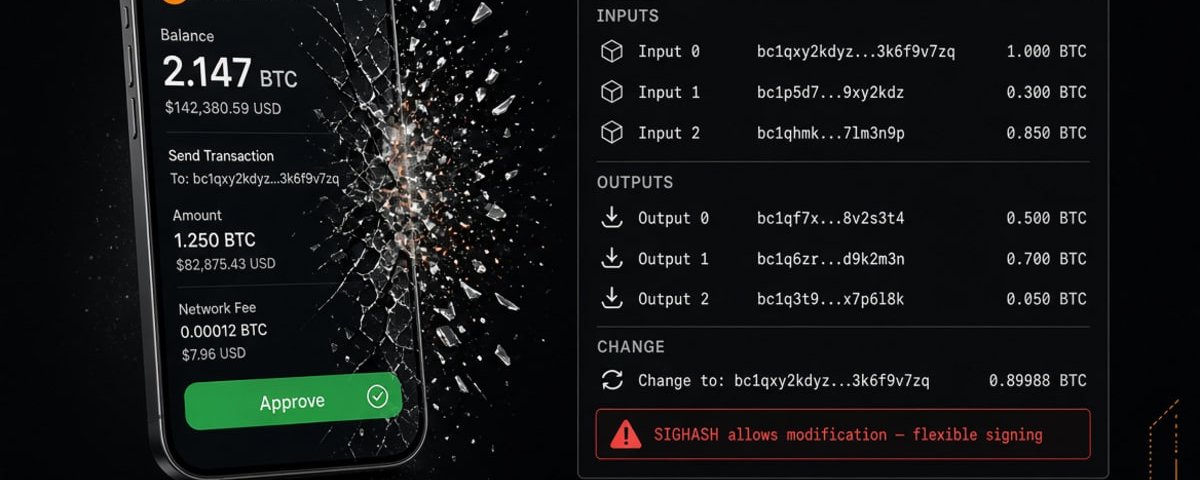
Most Bitcoin losses in self-custody don’t start with “the chain broke.”
They start with a calm screen and a green button.
Approve.
Done.
The dangerous sentence isn’t “I got hacked.”
It’s “I thought that’s what I signed.”
That gap has a name when the screen matches the bytes: WYSIWYS — what you see is what you sign.
When it doesn’t, the product failed a security boundary. The network did not.
Bitcoin never promised to honor your UI. It promised to settle a valid transaction. If those two disagree, bytes win. Every time. No refund desk.
The myth you’re still carrying
Self-custody culture taught people a comforting story:
Tap Approve when the screen looks right.
That story is backwards. You’re not authorizing a picture.
You’re authorizing a package — usually a PSBT: inputs, outputs, fees, and rules about how tight the signature is.
The UI is a narrator.
The package is the contract.
The chain only reads the contract.
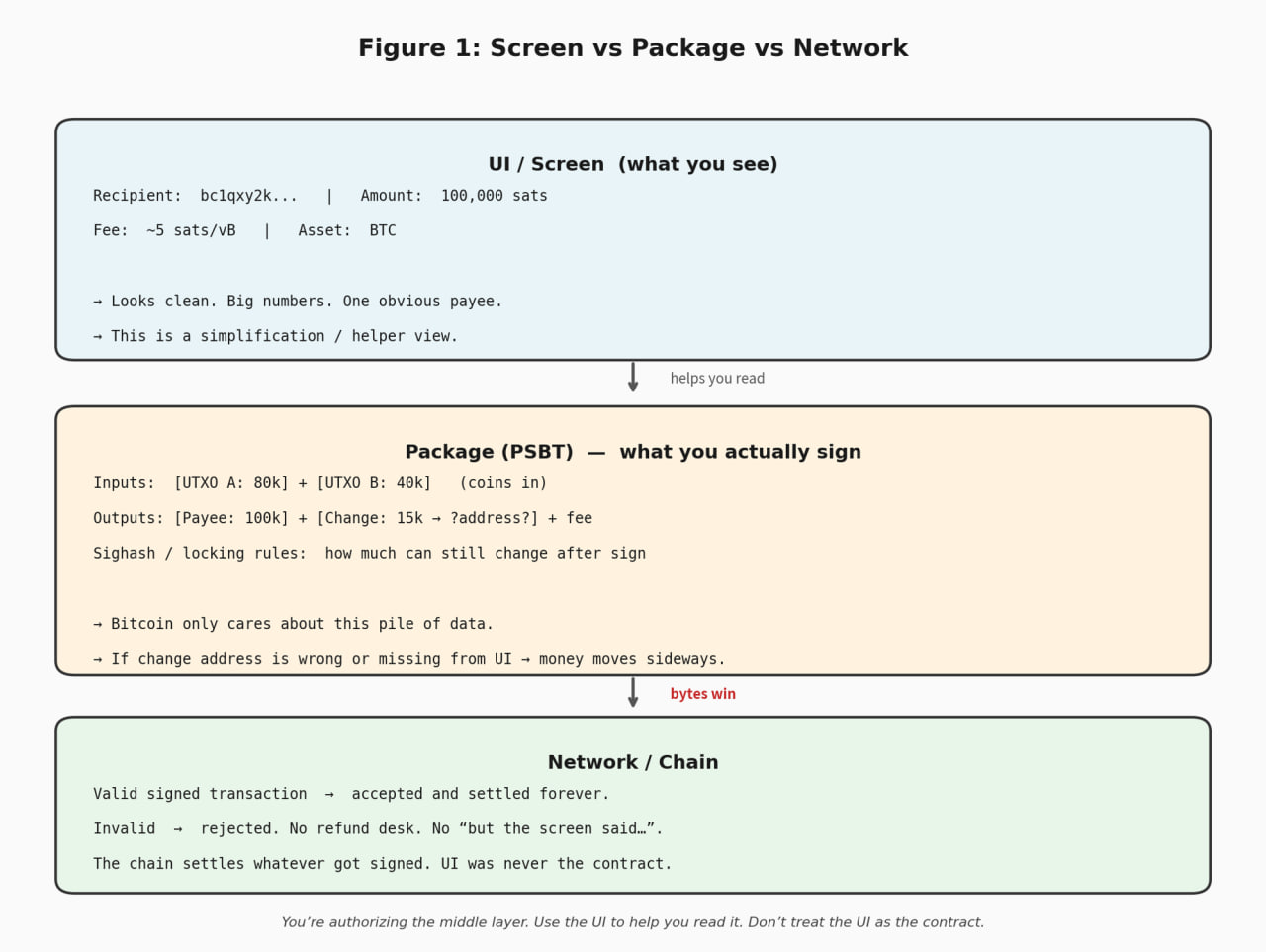
Use the screen to help you read the package.
Don’t treat the screen as the package.
Why this drains people without “hacking a seed”
No drama. Just mechanics.
1) The hero amount is a marketing layout
You send 100,000 sats. The UI highlights 100k and one payee. Looks clean.
Most payments also create change which is another output, often back to you. Sometimes not.
If you never open the full output list, you can miss an address that isn’t yours.
Payment amount looked perfect.
Still a bad transaction.
Rule: outputs first, fee second.
A “normal-looking” fee next to a wrong output set is useless.
2) Some signatures are strict. Some leave wiggle room.
Signing modes are poorly taught.
Some signatures lock the important fields hard.
Some leave room to change things after you sign.
Protocols and marketplaces sometimes need the flexibility.
A boring pay-a-friend transfer usually shouldn’t feel like a flexible contract.
When the flow says advanced / custom / dApp / PSBT, ask one question out loud:
What can still move after Approve?
If nobody can answer in normal words, you don’t know what you’re signing yet.
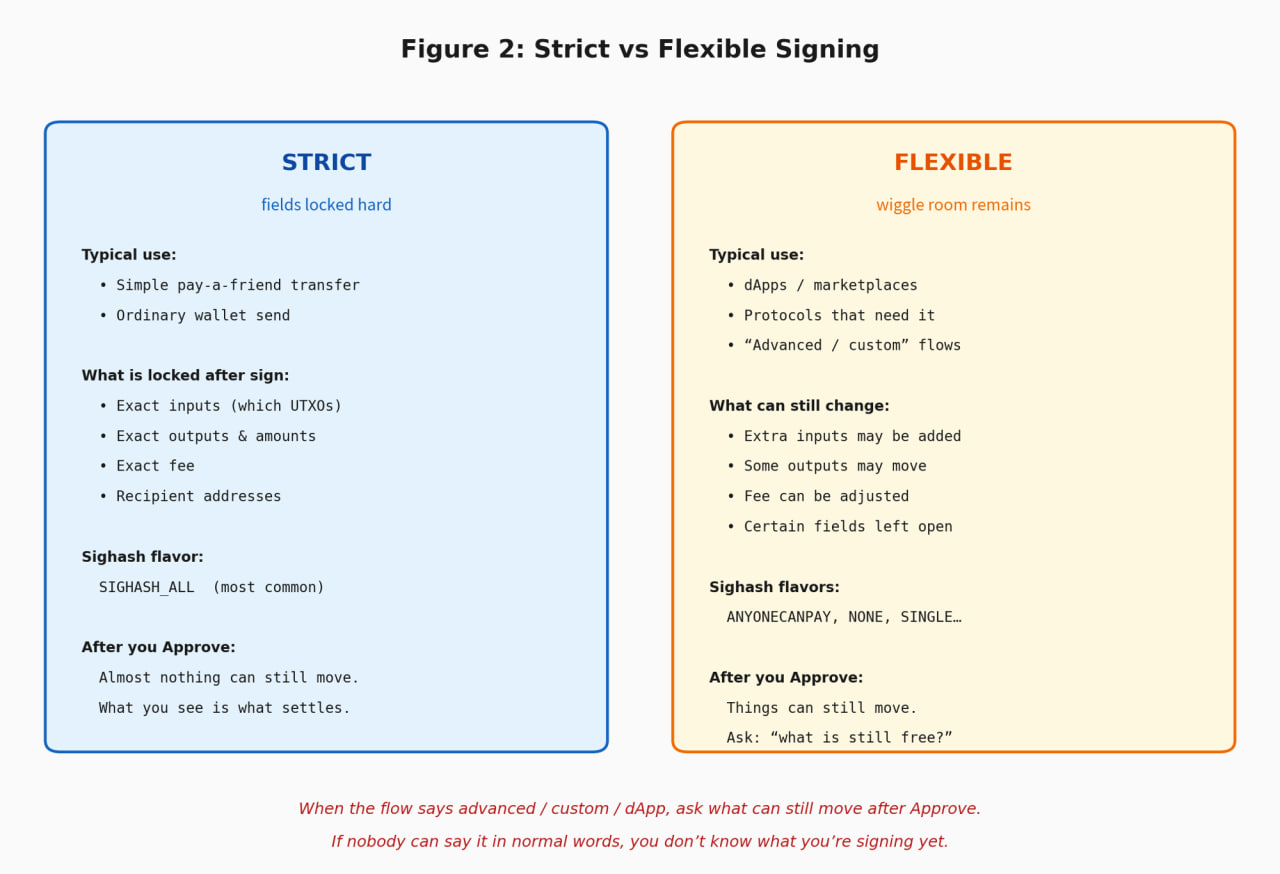
You don’t need to memorize BIP names.
You need to know whether the signature freezes the deal or leaves a door open.
3) “Balance” is a lie that costs assets
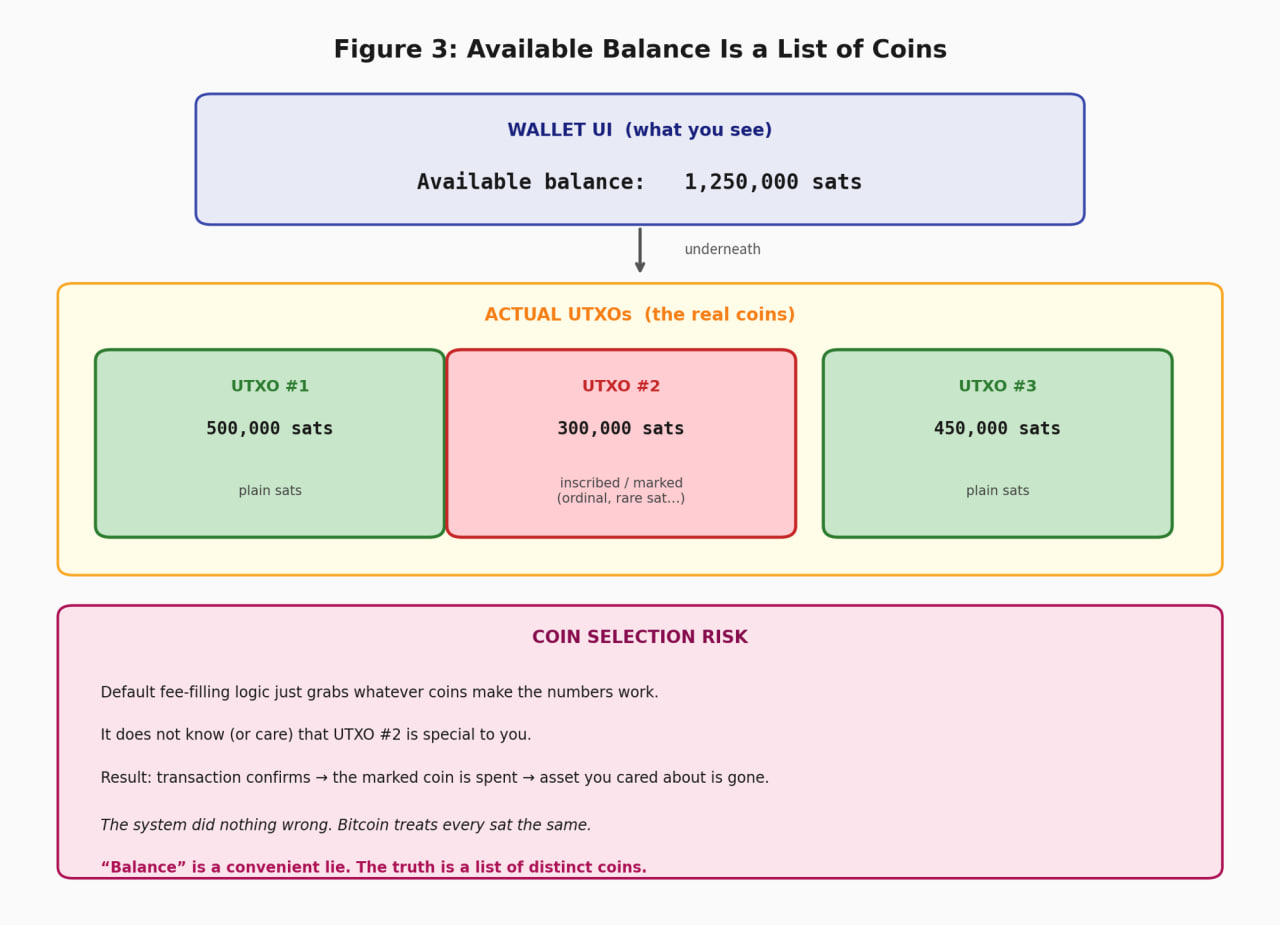
Your wallet shows one available number.
Underneath it’s a list of coins (UTXOs).
Plain sats for spending are not the same object as a coin you care about for an inscription or other marking.
Coin selection that just grabs whatever fills the fee can spend the wrong one.
Transaction confirms.
Asset you cared about is gone.
The system did nothing wrong. Your intent never made it into the package.
4) Remote “helpful” previews are narrators with a marketing budget
Decode APIs — names, risk labels, pretty summaries — are handy.
They’re also third-party stories.
If Approve hangs on a server story you can’t reconcile with the actual package, you’re trusting a narrator next to your keys.
Local decode of what you’re signing should win arguments.
Remote labels are advisory. Never the root of truth.
Steal this: three questions before Approve
Bookmark this. Use it until it’s muscle memory.
- Where do the coins go — every output, not just the hero amount?
Change included. Mystery destinations included. Count them. - What can still change after I sign?
If the answer is “nothing material,” you’re in strict territory.
If the answer is fuzzy, stop. - Am I spending a plain coin — or something I care about as an inscription / rare sat / marked UTXO?
Miss this and you can “pay a fee” with the wrong coin. The chain is correct. Your intent wasn’t.
If you can’t explain the outputs in one breath, you’re not ready to Approve.
Two different threats (don’t confuse them)
You built the send inside the wallet: you chose the shape. Still verify. But the construction path is yours.
A website or dApp hands you a PSBT: they chose the shape. You are blessing their package.
Slow down on the second one.
Not because every website is evil. Because you didn’t construct the thing you’re about to bless.
Also slow down on:
- batch signs
- anything labeled advanced / custom / PSBT
- speed-ups that rewrite a transaction you already understood
- “looks fine” summaries you can’t reconcile locally
Self-custody doesn’t mean click faster than an exchange.
It means you inherited the job of verification.
Builders: this is where professionalism shows
Stop burying the truth in docs.
Put every output on the Approve path.
If the signing mode is flexible, say so there — not in a footnote three clicks away.
Don’t quietly feed marked or mystery UTXOs into default fee selection.
Batch sign isn’t “send but more.”
A red icon with no sentence is theater.
Craft looks like this:
- Decode and show risk on a surface the user can trust
- Prefer local verification for what Approve means
- Treat remote previews as advisory, never as the root of truth
- Fail closed on weird signing modes; warn loudly when you can’t explain them
- Make the story earn the signature
Theater is a danger badge with no meaning.
Craft is a screen that matches the bytes.
The reframe that sticks
Bitcoin keeps exact promises.
Interfaces tell approximate stories.
Approve is a security boundary.
A lot of products still treat it like a continue button.
We’re not saying consensus is broken.
We’re saying the gap between screen and package is where money moves sideways — without anyone touching a seed.
A seed that was never as random as the box implied is a different failure. That’s the birth-event note. This one is the spend path.
GreyBound works on Bitcoin software where screen and bytes have to match.
When they don’t, bytes win.
Users find that out eventually.
Better if the product finds it out first.
FAQ
Is the wallet Approve screen what I am signing?
No. The screen is a preview. Bitcoin settles the PSBT you sign: outputs, change, sighash, fee.
What three questions should I ask before Approve?
Are all outputs the ones I intend. Does change return to my descriptor. Am I signing this exact object, not a remote or dapp preview.
Why is a remote preview unsafe as the only check?
A remote preview is another narrator. It can show a clean amount while the PSBT pays a different output.
Does checking the on-screen amount protect me?
No. The hero amount is a layout. Change, extra outputs, and sighash flags are where funds leave.
Discuss a signing flow with GreyBound
If you’re building a wallet, PSBT path, or Approve screen and the story has to match the bytes, that’s Review, Remediation, or Upgrades work. Tell us what you’re shipping.
Bitcoin Production Readiness: What Every Engineering Team Should Validate Before Launch
Continuer →